A new look
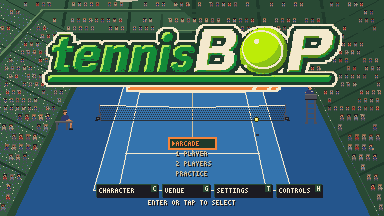
tennisBOP looks different this week. A new logo, a new home court, and buttons and help screens that show you what to do instead of telling you.
The logo
The old logo was grown like a hedge, which suited a garden club but not an arcade game. The new one is italic green lettering with a cream B and P, a cream border, and a green and orange underline. The O is a tennis ball, and on the title screen it spins, with a shine that sweeps across it every few seconds.
A blue home court
The default court is now Centre Court: a blue hard court in a packed stadium, with dark green stands full of little people. Blue makes the yellow ball and the white lines pop, and it gave the game a look you can recognise from a thumbnail. Clay and grass are still one tap away in the venue picker.
That same court is in the new key art: our player mid-forehand, the champion in her red cap at the net, and Table Mountain behind, because the game is made in Cape Town.
Buttons you can read
Every action has a button on screen, and you can tap, click or press the key printed on it. The shot buttons are round, with a little arrow showing each ball's path: flat for a drive, dipping for a slice and arcing for a lob. The stance button is a racket that leans to whichever side yours is on, and it says AUTO when the game is switching for you.
On a keyboard, the keys on the buttons follow the keys you actually press. Hit with J and the buttons say J. The help screens now draw them as real keys too.
A guide you watch
The old help was a page of text. The new controls guide has five pages, Move, Hit, Aim, Serve and Stance, and each one plays a looping demo next to the exact keys or buttons you'll use. Tap or press through them in a few seconds. The coach in your first match uses the same pictures, and each lesson holds for a moment behind a loading bar so you have time to read it.
There's more for phones too. Settings has a left-handed layout that puts the stick on the right, and a touch sensitivity setting. The menus have bigger buttons to tap, and there's a settings gear during play.
Two things went. The panel that asked you to turn your phone sideways is gone, and so is the screen that asked how fun the game was. If you're still playing, that's the answer.